Wednesday, December 16, 2009

Episode about the future of FreeNAS on bsdtalk

You will find here an excellent talk with Josh Paetzel from iXsystems about the future of FreeNAS. Many thanks for this information!

Saturday, December 5, 2009

The NEW Future of FreeNAS...

Olivier left me here a comment...

The FreeNAS project will continue to use FreeBSD in the future! This sounds excellent! Please read the original message on the blog and forum post.

Here is a copy of the message:

Hi all,

FreeNAS needs some big modification for removing its present limitation (one of the biggest is the non support of easly users add-ons).
We think that a full-rewriting of the FreeNAS base is needed. From this idea, we will take 2 differents paths:

  • Volker will create a new project called "'OpenMediaVault" based on a GNU/Linux using all its experience acquired with all its nights and week-ends spent to improve FreeNAS during the last 2 years. He still continue to work on FreeNAS (and try to share its time with this 2 projects).
  • And, a great surprise: iXsystems, a company specialized in professional FreeBSD offers to take FreeNAS under their wings as an open source community driven project. This mean that they will involve their professionals FreeBSD developers to FreeNAS! Their manpower will permit to do a full-rewriting of FreeNAS.
Personally, I come back to actively work in FreeNAS and begin to upgrade it to FreeBSD 8.0 (that is "production ready" for ZFS).

So we will see 'more' developers working on FreeNAS. Excellent!

Monday, November 23, 2009

Mac OSX Time Machine and FreeNAS 0.7

Since FreeNAS 0.7 it is easy to configure TimeMachine to use a AFP share (like Apple's Time Capsule)... Here is a short howto :-)

First step: Configure FreeNAS

-> Enable AFP
-> Configure the share
  • Automatic disk discovery - Enable automatic disk dicovery
  • Automatic disk discovery mode - Time Machine
Second Step: Configure OSX Time Machine

-> Select System Preferences -> Time Machine
-> Select Backup Disk
-> and Authenticate
Thats it!
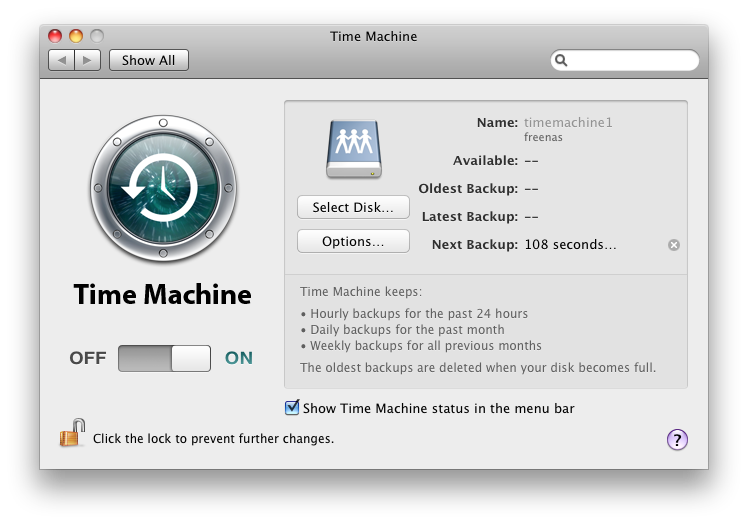

Your FreeNAS will work now similar than a TimeCapsule. Enjoy! Details can be found here...

I've combined this with ZFS. With two clients and regular backups since two months, I have here a compression (gzip) enabled volume with 238 GByte. The compression ratio (compressratio) is at 1.24x

freenas:~# zfs get compressratio data0/timemachine
NAME PROPERTY VALUE SOURCE
data0/timemachine compressratio 1.24x -


Instead of 295 GByte, only 238 GBytes are used. IMHO this is great :-)


If you want to see how to do a complete restore of your system, please see my new blogpost "Mac OS X system restore using time machine and FreeNAS"

Sunday, November 22, 2009

Overview of NAS Operation Systems

Do you have any experiences with one of those?

Friday, November 20, 2009

The Future of FreeNAS...

Please read here to get the latest news...

Read through this forum thread to see the actual discussion. In short...

FreeNAS 0.8 will be based on Debian GNU/Linux! Volker (the core developer) started an intermediate project called CoreNAS. FreeNAS 0.8 will be based on that.

Here is a short list of pros by Volker:
- Text and graphical installer that can be customized. This means no hand written install scripts anymore which causes some problems in FreeNAS
- WOL works in Linux
- lmsensor - A WORKING sensor framework which is a really needed feature in FreeNAS to check the CPU/MB temps and fan speeds
- Better Samba performance
- Ability to implement HA features
- System can be updated via 'apt-get' or any other deb package manager
- Better driver support
- Maybe 'ZFS' over FUSE (there is already one commercial product available that uses this feature)
- NFS4
- ...

What does this mean to me? I definetly want to have an OS which supports native ZFS (zfs on fuse is not an option). I don't need an extra small footprint or all of these 'special' features that some users of FreeNAS frequently requested (boinc, printserver...). I really appreciated the wonderful WebGUI of FreeNAS but if it is necessary, I'm not bound to it. As I have quite a lot experience with solaris, I will switch to Opensolaris. It has all I need except the AFP support. So I need to get more experience with Netatalk.
I am also really looking forward for the new features of ZFS like deduplication and crypto. If you are intersted about my experiences, you will find some here...

Nevertheless I would like to say many, many thanks for this wonderful piece of software!

Wednesday, October 21, 2009

FreeNAS 0.7 - Samba tuning

Here is a nice blogpost from learnedbyerror about tuning samba (and other...). Especially the samba/cifs tweaks should give you a performance boost.

I don't recommend to use the old zfs tuning settings as the latest FreeNAS Versions are based on FreeBSD 7.2 (see http://wiki.freebsd.org/ZFSTuningGuide).

Anyway, good blogpost!

Friday, October 9, 2009

FreeNAS 0.7, ZFS snapshots and scrubbing

I've described here how I am doing snapshots. Cron and a little script works perfect, but I also scrub from time to time the zpools. But the scrub never finishes :-(
The reason behind this is described here. Scrubbing or resilvering a pool starts over when a snapshot is taken.
So it is necessary to change the script that creates the snapshots

snapshot_hourly.sh

#!/bin/sh

# If a scrub is running, don't do a snapshot (otherwise scrub will restarts at 0%)
pools=$(zpool list -H -o name)
for pool in $pools;
do
if zpool status -v $pool | grep -q "scrub in progress"; then
exit
fi
done

# Destroy the old snapshot and create the new
zfs destroy $1@hourly.`date "+%H"` > /dev/null 2>&1
zfs snapshot $1@hourly.`date "+%H"`

snapshot_daily.sh

#!/bin/sh

# If a scrub is running, don't do a snapshot (otherwise scrub will restarts at $
pools=$(zpool list -H -o name)
for pool in $pools;
do
if zpool status -v $pool | grep -q "scrub in progress"; then
exit
fi
done

# Destroy the old snapshot and create the new
zfs destroy $1@daily.`date "+%a"` > /dev/null 2>&1
zfs snapshot $1@daily.`date "+%a"`

and snapshot_weekly.sh (please be aware that I use this script to keep snapshots of the last twelve weeks. If necessary, you need to change this...)

#!/bin/sh

# If a scrub is running, don't do a snapshot (otherwise scrub will restarts at $
pools=$(zpool list -H -o name)
for pool in $pools;
do
if zpool status -v $pool | grep -q "scrub in progress"; then
exit
fi
done

# Destroy the oldest snapshot, rotate the other and create the new
zfs destroy $1@weekly.12 > /dev/null 2>&1
zfs rename $1@weekly.11 @weekly.12 > /dev/null 2>&1
zfs rename $1@weekly.10 @weekly.11 > /dev/null 2>&1
zfs rename $1@weekly.9 @weekly.10 > /dev/null 2>&1
zfs rename $1@weekly.8 @weekly.9 > /dev/null 2>&1
zfs rename $1@weekly.7 @weekly.8 > /dev/null 2>&1
zfs rename $1@weekly.6 @weekly.7 > /dev/null 2>&1
zfs rename $1@weekly.5 @weekly.6 > /dev/null 2>&1
zfs rename $1@weekly.4 @weekly.5 > /dev/null 2>&1
zfs rename $1@weekly.3 @weekly.4 > /dev/null 2>&1
zfs rename $1@weekly.2 @weekly.3 > /dev/null 2>&1
zfs rename $1@weekly.1 @weekly.2 > /dev/null 2>&1
zfs snapshot $1@weekly.1

I've found a script from http://hype-o-thetic.com to run a scrub regularly. See his blogpost here...

Just for backup reasons, I post this script below...

#!/bin/bash

#VERSION: 0.2
#AUTHOR: gimpe
#EMAIL: gimpe [at] hype-o-thetic.com
#WEBSITE: http://hype-o-thetic.com
#DESCRIPTION: Created on FreeNAS 0.7RC1 (Sardaukar)
# This script will start a scrub on each ZFS pool (one at a time) and
# will send an e-mail or display the result when everyting is completed.

#CHANGELOG
# 0.2: 2009-08-27 Code clean up
# 0.1: 2009-08-25 Make it work

#SOURCES:
# http://aspiringsysadmin.com/blog/2007/06/07/scrub-your-zfs-file-systems-regularly/
# http://www.sun.com/bigadmin/scripts/sunScripts/zfs_completion.bash.txt
# http://www.packetwatch.net/documents/guides/2009073001.php

# e-mail variables
FROM=from@devnull.com
TO=to@devnull.com
SUBJECT="$0 results"
BODY=""

# arguments
VERBOSE=0
SENDEMAIL=1
args=("$@")
for arg in $args; do
case $arg in
"-v" | "--verbose")
VERBOSE=1
;;
"-n" | "--noemail")
SENDEMAIL=0
;;
"-a" | "--author")
echo "by gimpe at hype-o-thetic.com"
exit
;;
"-h" | "--help" | *)
echo "
usage: $0 [-v --verbose|-n --noemail]
-v --verbose output display
-n --noemail don't send an e-mail with result
-a --author display author info (by gimpe at hype-o-thetic.com)
-h --help display this help
"
exit
;;
esac
done

# work variables
ERROR=0
SEP=" - - - - - - - - - - - - - - - - - - - - - - - - - - - - - - - - - - - - - - - "
RUNNING=1

# commands & configuration
ZPOOL=/sbin/zpool
PRINTF=/usr/bin/printf
MSMTP=/usr/local/bin/msmtp
MSMTPCONF=/var/etc/msmtp.conf

# print a message
function _log {
DATE="`date +"%Y-%m-%d %H:%M:%S"`"
# add message to e-mail body
BODY="${BODY}$DATE: $1\n"

# output to console if verbose mode
if [ $VERBOSE = 1 ]; then
echo "$DATE: $1"
fi
}

# find all pools
pools=$($ZPOOL list -H -o name)

# for each pool
for pool in $pools; do
# start scrub for $pool
_log "starting scrub on $pool"
zpool scrub $pool
RUNNING=1
# wait until scrub for $pool has finished running
while [ $RUNNING = 1 ]; do
# still running?
if $ZPOOL status -v $pool | grep -q "scrub in progress"; then
sleep 60
# not running
else
# finished with this pool, exit
_log "scrub ended on $pool"
_log "`$ZPOOL status -v $pool`"
_log "$SEP"
RUNNING=0
# check for errors
if ! $ZPOOL status -v $pool | grep -q "No known data errors"; then
_log "data errors detected on $pool"
ERROR=1
fi
fi
done
done

# change e-mail subject if there was error
if [ $ERROR = 1 ]; then
SUBJECT="${SUBJECT}: ERROR(S) DETECTED"
fi

# send e-mail
if [ $SENDEMAIL = 1 ]; then
$PRINTF "From:$FROM\nTo:$TO\nSubject:$SUBJECT\n\n$BODY" | $MSMTP --file=$MSMTPCONF -t
fi